I wanted to differentiate them from the "new" labels. Since "new" was the odd one out (expressing recency rather than a topic), I changed its shape and color scheme. Here's how looked before.
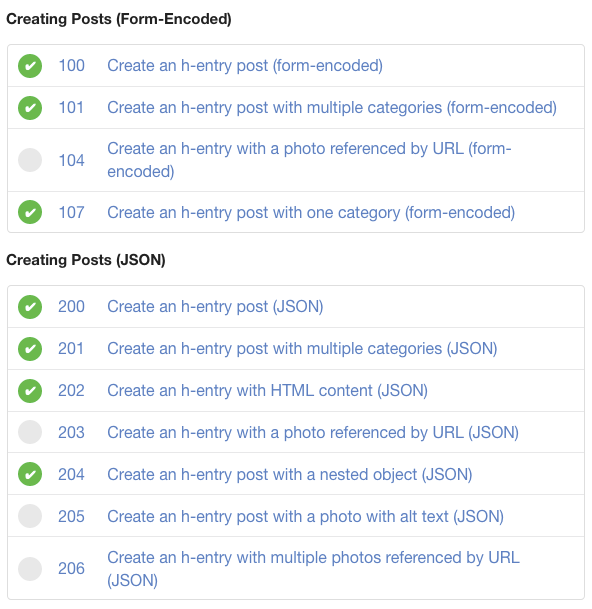
I'm running my Micropub implementation against the official test suite at micropub.rocks. Despite the fact that I haven't implemented the entire specification (much less the extensions), my version already passes about a third of the test suite -- and a couple of the failed tests gave enough feedback to code fixes on the spot. Full steam ahead!
Tests for creating posts via Micropub (other tests not shown.)
I've spent the last couple weeks developing version 2 of this website as a Python Flask-based web application. This has required learning more about server administration, as well as putting into use the web-app development skills I've been chipping away at all year.
I'm happy to report that the new version of this site will be going live next week, with Micropub support implemented. Your end user experience should not change at all (but please report any broken links!) Improvements to navigation, content discovery, subscription, tags, and syndication are forthcoming.
My main motivation for this upgrade was to lower my self-imposed barrier to public writing and interaction.
My friend Matt and I just discovered that Android's (default) text-messaging app can now send voice messages.
Voice messaging (on WeChat) was everywhere when I lived in China, and I've missed it as an option for texting in the States. I suppose the demand for voice messaging is filled here by Snapchat, whatever Facebook does, and voice iMessages for the Apple ecosystem. I don't use those, so I have been a text-only plebeian -- until now!
I think I'll be using voice messages a lot, especially during the coronavirus pandemic. My words, in my voice, represent me more closely than writing can. I'm glad to find a way to move some of my normal communication away from pure text.
Responsive web design is the practice of ensuring that website material adapts to the capabilities of the user's device. I've taken some steps in the last couple days to make this site more responsive.
How this benefits you:
on mobile, all website text now loads at a device-appropriate size, rather than appearing zoomed-out
mobile images now load at a device-appropriate size, saving you from wasting time and mobile bandwidth on oversized downloads
images now resize themselves in your display, such as moving from portrait to landscape or shrinking the browser window
at smaller screen sizes, lines of poetry now wrap to fit your display, instead of running off the page or requiring you to scroll
Today is Day 2 of 2 for IndieWebCamp Online 2020, which means today is Hack Day! My goal for the day is to reconstruct my poems page.
[As of 15:32:57, I'm all done!]
My first task today is to solve the page-redirect woes that I've been blogging about since a few days ago. Diligent implementation of the solutions given in S3's documentation got me nowhere, so I'll use a little JavaScript to redirect from the old poems URL to the new one.
[2020-02-09T09:38:25-0800: first task complete!]
With the redirect in place, I can proceed to the larger of today's tasks: breaking out each poem onto its own page. This will accomplish two goals:
Edit, 2020-02-09T13:52:23-0800: I've finally solved this problem by replacing poems with a stub page that redirects to poems/index, using JavaScript to preserve the URL fragment. Mission accomplished--no thanks to S3!
Edit, 2020-02-07T20:15:29: I've tried using the other form of S3 redirect: uploading a zero-byte file called poems and adding a redirect from that file to the new /poems/index location. We'll see if that works.
Edit, 2020-02-07T10:48:32: Dammit, I don't know what I'm doing. Can anyone help?
Redirecting from the no-longer-existent poems file to the new poems/ in the "Static Website Hosting - Redirection Rules" section of the S3 Console is not working at all: I get the AWS-default 403 (Access Denied) return code (which AFAIK is masking an underlying 404 Not Found, given that poems has been deleted from the bucket.) I'm already stuck, and it's only step one of the plan below! Here are the routing rules I'm using.
If you look at the bottom of this post, after the main text, you'll see that I've added tags to categorize the pages of my website. Clicking one of the links in the "Tags" section will take you to a summary page, listing all the posts with that tag.
Originally, a bug was causing the phrase "Tags: " to show up even on pages without any tags, but as of 2019-12-08 I've rewritten the code to take care of that.
Before this morning, I had two barebones Emacs commands which I used to open my website in a browser. One opened the index page in the build folder, and one opened the index page on the deployed site.
Since I frequently used the "browse-locally" command to check how the site looks before deploying, but rarely used the command to browse the deployed site, I turned the latter into an option triggered by passing an argument.
More substantially, browsing the index page is still the default, but if I'm viewing a webpage's source in Emacs, the command instead browses that page on the (local or deployed) site. This is usually what I want when checking pages.
I've coded a new feature for the blog: "previous" and "next" links! As you can see below, each post now links to its predecessor and/or successor. (IndieWeb people, those links have rel="prev"/rel="next" classes on them for machine consumption.)
Further improvements will include post tags, on the index and on individual posts; I also want to display approximate wordcounts for each post. And of course, I'm still missing comments (but that will take more doing than the other two.)
Today I upgraded my website publishing software. From now on, new articles (individual pages which are longer and less time-dependent than blog posts) will automatically come with a date and time of publication. I'll be manually adding publication dates to prior articles over the next week or so.
Along the way, I fixed a problem I was having with adding "time last updated" to pages and blog posts. I had to manually position the mouse in the right spot before running a command to add the current time and date. Now all that is done automatically with one command, mj/insert-webpage-update-time. Having this command written also puts me 90% of the way toward the next logical step, which is automatically setting the "time last updated" every time I save a file for the site. I'll get to that in the future.
With advice from Greg McVerry, Aaron Parecki, and Ryan Barrett, I finished getting this blog set up for subscription using the `h-feed` microformat, and made other improvements along the way.
How this benefits you:
You can now subscribe to this website if your reader understands h-feed
Posts which have received updates since publishing now display their "last updated time"
For posts with explicit titles, the blog index displays them, making it more rewarding to manually browse the index
In addition to the above, all pages' titles now link to themselves, and each link in the blog index now has proper h-entry markup.
Another day, another website upgrade. My script for counting total words of written material was including articles, but leaving out blog posts. Now it's been fixed!
As of right now, the publication timestamp before this paragraph reads "Published on 2019-10-20, around 18:14:20". This timestamp is also a permalink for this page.
The dates on these posts ("2019-10-20") have been there since soon after I started this blog, but I just added the time-of-day information ("around 18:14:20") today. A machine-readable version of the time, including the time zone, has also been invisibly included in the permalink's HTML.
I did this as one step in upgrading my website so that other people can subscribe to it. If I only provided the date of publication, but not the time, someone else's reader program wouldn't be able to put my post in chronological order when compared with another post.